
Event Registration Forms
Event Registration Form
A flexible starting point for any event registration. Collects attendee and organization details, registration type, session selections, dietary and accessibility needs, and payment, with room to add whatever your program requires.
Overview
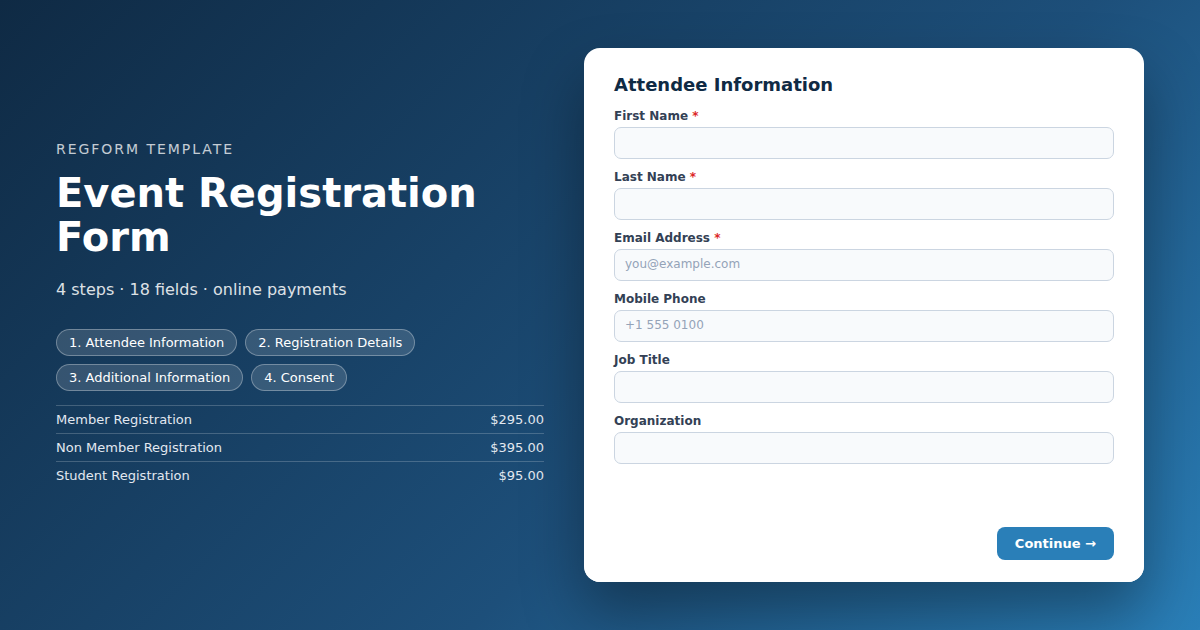
This is the general purpose registration form to start from when your event does not need anything unusual. It works for a one day conference, a quarterly members meeting, a training session, a workshop series, or an internal company event. Every other template in this directory is a variation on the structure below.
What this form does
The form gathers four things in order: who the attendee is, what they are registering for, what the organizer needs to know to host them well, and how they are paying. Grouping the questions this way keeps the form short on screen and keeps your export clean when registration closes.
Registration type is the field that does the most work. It drives pricing, it decides which follow up questions appear, and it becomes the segment you report on afterward. Set it up before you adjust anything else.
Who it is for
Event managers, membership staff, marketing teams, and training coordinators who need a working registration page today rather than a custom build. If your event has tiered pricing, member and non member rates, session capacity limits, or an approval step, start here and layer those on.
How to adapt it
Delete any field you will not act on. A question that nobody reads after the event is a question that costs you completions. Two additions are usually worth making instead: a field that affects cost, and a field that affects logistics such as catering, seating, or badge printing.
Form field list
Attendee Information
| Field | Type | Required | Notes |
|---|---|---|---|
| First Name | text |
Required | — |
| Last Name | text |
Required | — |
| Email Address | email |
Required | — |
| Mobile Phone | phone |
Optional | — |
| Job Title | text |
Optional | — |
| Organization | text |
Optional | — |
Registration Details
| Field | Type | Required | Notes |
|---|---|---|---|
| Registration Type | item_select |
Required | — |
| Attendance Format | radio |
Optional | — |
| Sessions or Workshops | checkbox |
Optional | — |
| Promo or Member Code | text |
Optional | — |
Additional Information
| Field | Type | Required | Notes |
|---|---|---|---|
| Dietary Restrictions | checkbox |
Optional | — |
| Accessibility Requests | textarea |
Optional | — |
| Emergency Contact Name | text |
Optional | — |
| Emergency Contact Phone | phone |
Optional | — |
| How Did You Hear About This Event | dropdown |
Optional | — |
Consent
| Field | Type | Required | Notes |
|---|---|---|---|
| I consent to photography and video at this event | checkbox |
Optional | — |
| Terms and Cancellation Policy | legal |
Required | — |
| Send me updates about future events | checkbox |
Optional | — |
How it's built in Regform
Setup checklist
- Set your registration types and prices. Replace the placeholder options with your real tiers, such as member, non member, student, speaker, exhibitor, and staff. Attach a price to each one so the total calculates on selection.
- Turn on conditional logic. Show the promo code field only to the tiers that can use one. Show billing fields only when the attendee selects invoice or purchase order. Hide the travel and dietary questions from virtual attendees.
- Connect payment. Link your Stripe account so paid registrations are captured at submission. Leave payment off entirely for free internal events and the section will not render.
- Set capacity. Apply a limit to the whole form, to a session, or to a single registration type. Regform closes the option when the limit is reached rather than failing at submission.
- Write the confirmation email. Include the date, the location or join link, the cancellation policy, and the receipt. This message is the one most attendees search for the morning of the event, so make it findable.
- Add the deadline. Close registration automatically at a date and time, and decide what the page says after it closes. A waitlist link works better than a dead page.
Before you publish
Submit a test registration as each registration type, pay with a test card, and confirm the record lands where you expect it, whether that is your CRM, a spreadsheet export, or a badge printing file. Check the form once on a phone. Most event registrations are started on one.
Frequently asked questions
Can I use this template for a free event?
Yes. Leave the payment section off and the form works as a straight sign up. The registration type field is still worth keeping, because it is how you tell members from guests and staff from attendees when you report on turnout.
How do I charge different prices for members and non members?
Attach a price to each option in the registration type field. The total updates when the attendee makes a selection, and the correct amount is charged at submission. If membership has to be verified, add a member code field and show it only to the member tier.
Can I limit how many people register?
Yes, at three levels. Cap the whole form, cap an individual session, or cap a single registration type. When a limit is reached the option stops accepting registrations rather than letting someone fill out the form and fail at the end.
Will attendees get a confirmation email?
Yes. A confirmation goes out on submission and you control what it contains. Include the date, the location or join link, the receipt, and the cancellation policy. Add a calendar file so the event lands on their calendar while they are still paying attention.
How do I get the registrations out of the form?
Export to a spreadsheet, push each submission to your CRM or marketing tool, or send it onward with a webhook. If you are printing badges or running onsite check in, sending registrations straight into your check in system avoids a manual import the week of the event.
Can someone register more than one person at a time?
Yes, though group registration changes the shape of the form. One person supplies billing details and then adds each attendee, so the attendee section repeats while the payment section does not. Start from this template and make the attendee block repeatable, or use a group registration template if your event runs mostly on team sign ups.
What happens if someone needs to cancel or transfer?
Handle it in the registration record rather than in the form. Decide the refund and transfer rules before you publish, state them next to the terms checkbox, and repeat them in the confirmation email. Most cancellation disputes come from a policy nobody saw at the time of purchase.
Browse related categories
Form type: Event Registration Forms
Use cases: Attendee Registration
Capabilities: Conditional Logic Confirmation Email Payment Collection
Ready to launch your event registration form?
Tell us about your event and we'll set this template up with you — fields, logic, payments, and all.
- Multi-step forms & conditional logic
- Built-in checkout, payments & invoicing
- Event registration, reporting & team roles
Use This Template
We'll reach out and get you building.
Download template (JSON)Import the file with the builder's Import button in your own account.
Already have an account? Sign in