
Event Survey and Feedback Forms
Post Event Survey Form
Short enough to finish on a phone. Consistent rating scales for programme and logistics, three open questions, and an automatic follow up when the overall score comes back low.
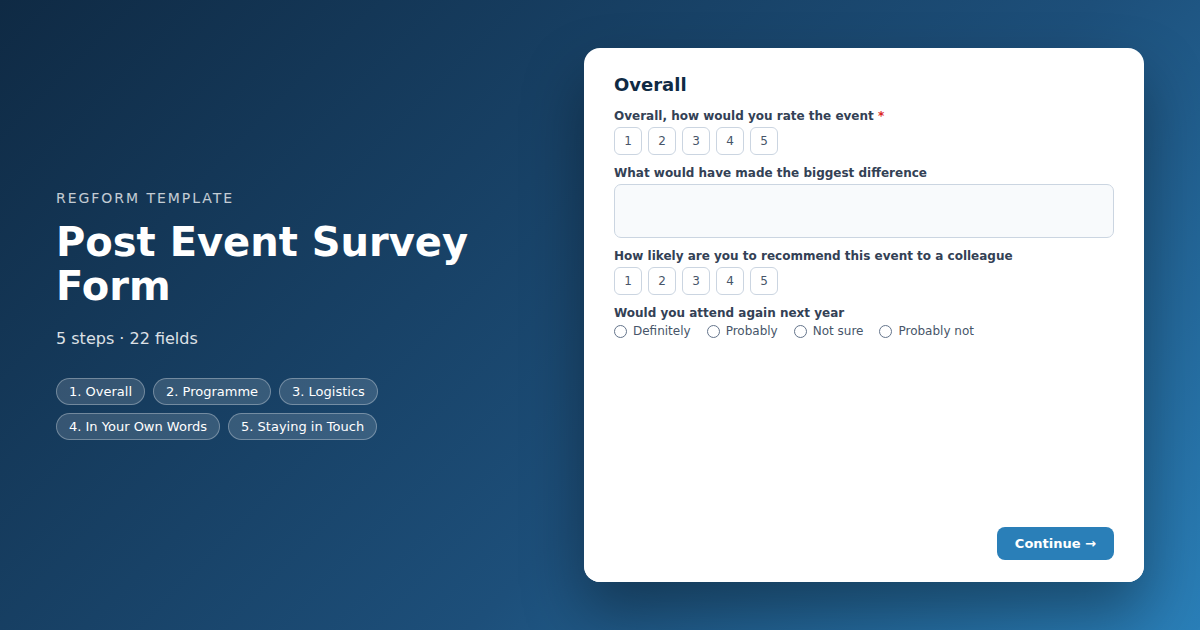
Overview
Most post event surveys are too long, sent too late, and produce an average score nobody acts on. This one is built around the two things that actually change next year's event: a consistent set of scores you can compare year over year, and a way of catching the people who had a bad experience while they are still willing to explain it.
How it is structured
Four short sections. An overall rating and a recommendation score, then the programme, then logistics, then open comments. Almost everything is a single tap on a rating scale, which is what keeps it finishable on a phone in the taxi to the airport.
One rule does the important work. When the overall rating comes back at five or below, an extra question appears asking what would have made the difference. Those answers are worth more than every average in the report.
Who it is for
Anyone who runs the same event more than once. Conference and association teams, training providers, and corporate event managers who have to justify the programme internally and need numbers rather than impressions.
How to adapt it
Replace the open text session questions with a dropdown of your real sessions, because that turns unreadable free text into a count. Beyond that, resist adding questions. The discipline in a survey is what you leave out, and every question past the three minute mark costs you responses from exactly the people whose opinion you were trying to capture.
Form field list
Overall
| Field | Type | Required | Notes |
|---|---|---|---|
| text_block | text_block |
Optional | — |
| Overall, how would you rate the event | linear_scale |
Required | — |
| What would have made the biggest difference | textarea |
Optional | — |
| How likely are you to recommend this event to a colleague | linear_scale |
Optional | — |
| Would you attend again next year | radio |
Optional | — |
Programme
| Field | Type | Required | Notes |
|---|---|---|---|
| Quality of the programme content | linear_scale |
Optional | — |
| Quality of the speakers | linear_scale |
Optional | — |
| Relevance to your work | linear_scale |
Optional | — |
| Which session was most valuable to you | text |
Optional | — |
| How did the session lengths feel | radio |
Optional | — |
| Value of the networking opportunities | linear_scale |
Optional | — |
Logistics
| Field | Type | Required | Notes |
|---|---|---|---|
| The venue | linear_scale |
Optional | — |
| Food and refreshments | linear_scale |
Optional | — |
| Registration and check in | linear_scale |
Optional | — |
| Communication before the event | linear_scale |
Optional | — |
| Value for the registration fee | linear_scale |
Optional | — |
In Your Own Words
| Field | Type | Required | Notes |
|---|---|---|---|
| What worked well | textarea |
Optional | — |
| What would you change | textarea |
Optional | — |
| What topics or speakers would you like next year | textarea |
Optional | — |
Staying in Touch
| Field | Type | Required | Notes |
|---|---|---|---|
| I would be interested in | checkbox |
Optional | — |
| You may contact me about my feedback | checkbox |
Optional | — |
| Email Address | email |
Optional | — |
How it's built in Regform
Setup checklist
- Send it within 24 hours. Response rates fall off a cliff after the first day and keep falling. A survey sent the following Monday is measuring who still remembers, not what happened.
- Name your actual sessions. The session questions ship as open text because session lists differ for every event. Replacing them with a dropdown of your real sessions makes the answers countable instead of something a person has to read and sort.
- Keep the scales consistent. Everything here is a five point scale except the recommendation question, which is out of ten. Mixing scale lengths across questions is the fastest way to make a year over year comparison meaningless.
- Leave the low score follow up in. A rule reveals an extra question when the overall score is five or below. Those answers are worth more than the rest of the survey combined, because they come from people who are still engaged enough to tell you why.
- Decide what happens with the contact opt in. People who tick it are offering you a conversation. If nobody is going to follow up, take the field out rather than collecting a promise you will not keep.
- Do not require anything except the first question. Every required field on a voluntary survey costs you completed responses, and a partially answered survey is still useful.
Before you publish
Submit once with a high score and once with a score of three, and confirm the follow up question appears only the second time. Then read the whole thing on a phone, since that is where most people will open it, and count how long it takes you. If it is over three minutes, cut something.
Frequently asked questions
When should I send a post event survey?
Within twenty four hours, and ideally while people are still travelling home. Response rates drop sharply after the first day and keep dropping through the week. A survey that goes out the following Monday measures who still remembers the event rather than what they actually thought of it.
How long should the survey be?
Short enough to finish on a phone in under three minutes. This template is around twenty questions, most of them single taps on a rating scale, with three open text boxes at the end. Every question you add past that point costs you completed responses, and a completed mediocre survey beats an abandoned thorough one.
What is the low score follow up for?
A rule watches the overall rating and reveals an extra question when it is five or below. Those responses are the most valuable thing in the survey, because somebody who had a bad experience and is still filling in your form is telling you something specific. Reading those answers individually is worth more than any average.
How do I ask about specific sessions?
Replace the open text session fields with a dropdown listing your actual sessions. The template ships them as free text because every event has a different programme, but free text answers have to be read and sorted by a person. A dropdown gives you a count you can act on immediately.
Should I use five point or ten point scales?
Keep every question on the same scale length unless you have a reason not to. This template uses five points throughout, except the recommendation question which uses ten because that is the convention for it. Changing a scale between years makes your comparison worthless, so decide now and leave it alone.
Should I ask for contact details?
Only if somebody will actually follow up. The contact opt in collects an email address from people offering you a conversation, and there is a separate question about speaking, sponsoring or volunteering next time. Both are genuinely useful, and both are worse than not asking if the responses go nowhere.
Why is almost nothing required?
Nothing except the first rating is required, which is deliberate. On a voluntary survey every required field is a reason to close the tab, and a half completed response still tells you something. The one exception is the follow up question revealed by a low score, because somebody who has flagged a problem is already willing to explain it.
Browse related categories
Form type: Event Survey and Feedback Forms
Use cases: Post Event Feedback
Capabilities: Conditional Logic Confirmation Email
Ready to launch your post event survey form?
Tell us about your event and we'll set this template up with you — fields, logic, payments, and all.
- Multi-step forms & conditional logic
- Built-in checkout, payments & invoicing
- Event registration, reporting & team roles
Use This Template
We'll reach out and get you building.
Download template (JSON)Import the file with the builder's Import button in your own account.
Already have an account? Sign in