
Event Registration Forms
Webinar Registration Form
A deliberately short form for virtual sessions. Collects only what you need, delivers the join link and calendar invite instantly, and keeps the registration list clean enough to segment.
Overview
A webinar registration form has one job and one enemy. The job is to hand over a join link and a calendar entry in the next ten seconds. The enemy is length. Nobody is filling out fourteen fields to attend a free hour long session, and every field you add is a measurable drop in registrations.
What to collect, and what to leave out
Name, work email, company, and one question that tells you something about who registered. That is the whole form. The temptation is to add role, company size, budget, timeline, and current vendor, because marketing wants a scored lead. Ask one of those, not five. You can enrich the rest from the email domain or ask in the follow up.
What happens after submission matters more
Most of the value of this form is downstream. The confirmation carries the join link and a calendar file. Two reminders, one a day before and one fifteen minutes before, decide how many registrants actually attend. The recording goes to everyone who registered, not just those who showed up, because registration is the signal you care about.
Who it is for
Marketing teams running demand generation webinars, associations delivering virtual education sessions, and product teams hosting customer training or release briefings.
Form field list
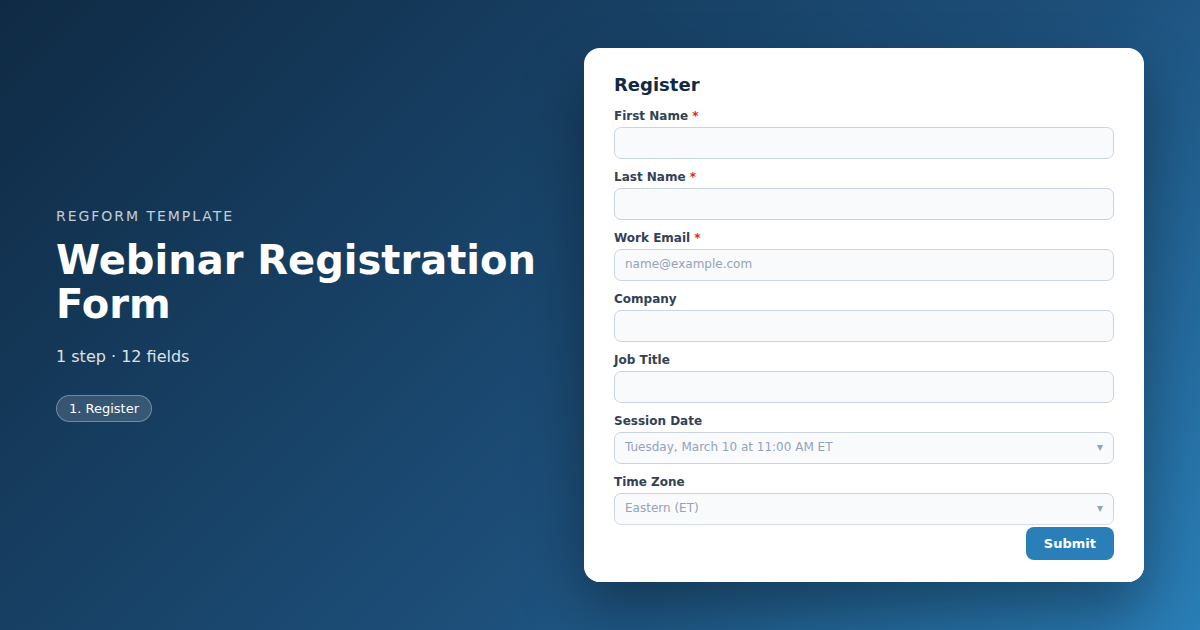
Register
| Field | Type | Required | Notes |
|---|---|---|---|
| First Name | text |
Required | — |
| Last Name | text |
Required | — |
| Work Email | email |
Required | — |
| Company | text |
Optional | — |
| Job Title | text |
Optional | — |
| Session Date | dropdown |
Optional | — |
| Time Zone | dropdown |
Optional | — |
| Which Best Describes Your Role | dropdown |
Optional | — |
| Tell Us Your Role | text |
Optional | — |
| What Would You Like Us to Cover | textarea |
Optional | — |
| Send me the recording if I cannot attend | checkbox |
Optional | — |
| Send me updates about future sessions | checkbox |
Optional | — |
How it's built in Regform
Setup checklist
- Cut the form to the bone. Name, email, company, and one qualifying question is the working default. Every additional field measurably reduces registrations, and for a free webinar you have very little goodwill to spend.
- Deliver the join link immediately. The confirmation should arrive within seconds and contain the link, the date and time with the time zone spelled out, and a calendar file. Registrants who do not get an instant confirmation assume it failed.
- Connect the webinar platform. Push each registration to Zoom, Teams, or whichever platform you use so unique join links are generated automatically. Manually adding registrants does not scale past the first session.
- Show the time zone. Display the session time in the registrant's local time zone if you can, and always state the zone explicitly. Time zone confusion is the single largest cause of no shows for virtual events.
- Ask the qualifying question. One question about role, company size, or current situation turns a registration list into a segmentable list. Ask it as a dropdown so the answers are clean enough to filter on.
- Set up the reminder sequence. Send a reminder twenty four hours before and a second one fifteen minutes before with the link in both. Webinar attendance rates live or die on that second reminder.
- Plan the on demand path. Most registrants will not attend live. Send the recording to everyone who registered, and use the same form as the gate for the on demand replay afterward so the asset keeps generating leads.
Before you publish
Register yourself, confirm the join link works, and check that the record reaches your CRM with the source and campaign intact. Then open the confirmation email on a phone. That is where the link will be clicked.
Frequently asked questions
How many fields should a webinar form have?
Four or five. Name, work email, company, and one qualifying question covers almost every case. Anything beyond that starts costing you registrations, and for a free session the registrant has very little invested in finishing what they started. If marketing wants more detail, enrich it from the email domain afterward or ask in the follow up email instead.
How do registrants get the join link?
Connect the form to your webinar platform so each registration generates a unique join link automatically, then include that link in the confirmation email and in both reminders. Do not rely on registrants keeping the first email, because most of them will look for the link five minutes before the session starts and search their inbox for whichever message is newest.
Can I ask a qualifying question without hurting conversion?
Yes, and it is one of the few extra fields worth keeping. A single dropdown about role, company size, or current situation makes the list segmentable and tells sales who is worth a follow up call. Keep it to one question and make it a dropdown rather than open text, so the answers are clean enough to filter on later without manual tidying.
Should I send the recording to people who did not attend?
Send it to everyone who registered, not just those who attended live. Registration is the intent signal that matters, and the replay is what most of your list was planning to watch anyway once the calendar conflict appeared. Then use the same form to gate the on demand version, so a webinar you ran once keeps generating registrations for months afterward.
How do I handle time zones?
State the time zone explicitly everywhere the time appears, on the form, in the confirmation, and in both reminders, and show it in the registrant's local time if your form can detect it. Most virtual event no shows come from someone misreading the time zone rather than from a change of heart, and it is the easiest attendance problem you will ever fix.
Can I use one form for a webinar series?
Add a series field so registrants can select individual sessions or sign up for all of them at once, and send a separate confirmation and reminder for each session. One registration covering the whole series is more convenient for the registrant, but it tends to produce worse per session attendance, because the reminder cadence gets diluted across dates that are weeks apart.
Browse related categories
Form type: Event Registration Forms
Use cases: Attendee Registration Virtual and Hybrid Events
Capabilities: Conditional Logic Confirmation Email
Ready to launch your webinar registration form?
Tell us about your event and we'll set this template up with you — fields, logic, payments, and all.
- Multi-step forms & conditional logic
- Built-in checkout, payments & invoicing
- Event registration, reporting & team roles
Use This Template
We'll reach out and get you building.
Download template (JSON)Import the file with the builder's Import button in your own account.
Already have an account? Sign in