
Event Registration Forms
Group Registration Form
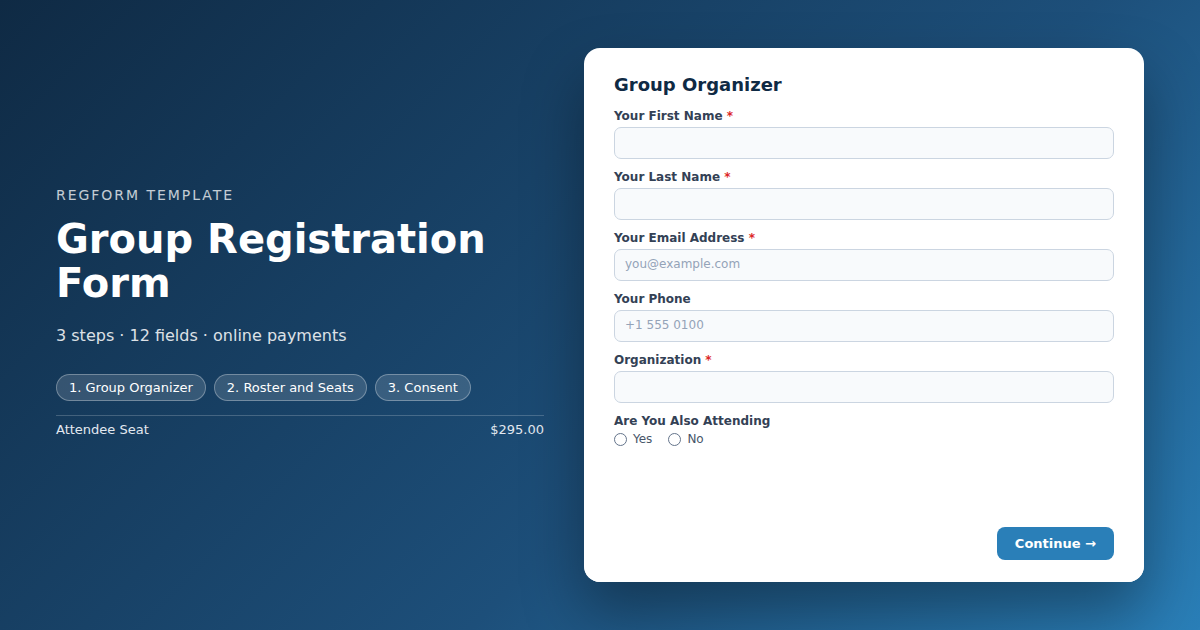
For one organizer registering a whole team. The attendee block repeats once per seat, rule driven group pricing drops the per seat rate as the roster grows, and every attendee becomes their own record.
Overview
Group registration breaks the usual shape of a form. One person fills it out, but the questions are about other people, and the answers repeat. Trying to handle that with a standard registration form is what leads to five separate submissions paid on five different cards and a roster nobody can reconcile.
How the form is structured
Three parts. The organizer answers for themselves once. Then they choose a number of seats, and the attendee questions repeat once per seat, because the seat item carries a per unit sub form. Checkout is cart based, so payment happens once at the end through Stripe rather than as questions on the form.
Group pricing is handled by conditional logic rather than a fixed price list. Rules watch the seat count and set the per seat price directly, so the rate falls as the roster grows without anybody needing to know a code. A promo code can drive the same thing if you would rather control it that way.
Who it is for
Associations selling team rates to member organizations, corporate training teams enrolling a department, conferences with a table or delegation model, and any event where one purchase covers several seats.
How to adapt it
Decide two things before building: where your price bands sit, and whether every name is required at the point of purchase. Everything else follows. If you want attendees to pay for themselves, this is the wrong template. Use the standard event registration form and let each person register individually.
Form field list
Group Organizer
| Field | Type | Required | Notes |
|---|---|---|---|
| Your First Name | text |
Required | — |
| Your Last Name | text |
Required | — |
| Your Email Address | email |
Required | — |
| Your Phone | phone |
Optional | — |
| Organization | text |
Required | — |
| Are You Also Attending | radio |
Optional | — |
Roster and Seats
| Field | Type | Required | Notes |
|---|---|---|---|
| Group or Team Name | text |
Optional | — |
| Attendee Seats | item_select |
Required | — |
| text_block | text_block |
Optional | — |
| Group or Promo Code | text |
Optional | — |
Consent
| Field | Type | Required | Notes |
|---|---|---|---|
| Terms, Refund and Substitution Policy | legal |
Required | — |
| I am authorized to register these attendees and to share their dietary and accessibility details | checkbox |
Optional | — |
How it's built in Regform
Setup checklist
- Price the seat, not the group. The cart holds a single Attendee Seat item. The organizer chooses a quantity and the attendee questions repeat once per seat, because the item carries a per unit sub form. Checkout is cart based, so payment is collected by Stripe at the end rather than as questions on the form.
- Discount with conditional logic. The template ships with two rules that watch the seat count and set the per seat price directly, one band for five to nine seats and one for ten or more. Keep the bands mutually exclusive. Two rules that can both pass on the same item at once will fight over the price, and the winner is not guaranteed.
- Or discount with a promo code. A code can be applied by a rule instead of by the registrant typing it. Note that promo codes cannot travel inside a template, so the code itself has to be created on the form after import, and the rule that applies it will do nothing until it exists.
- Decide whether names are mandatory. The sub form is set to required, so every seat needs a name and email before checkout. If organizers routinely buy seats before they know who is coming, turn that off and chase the names later.
- Cap the group if the room does. Put a quantity cap on the seat item so a group cannot buy more seats than you have.
- Decide about attendee emails. Each seat collects its own email, so every attendee can get their own confirmation while the organizer gets the summary. That surfaces typos while there is still time to fix them.
- Plan the roster edit path. Names change between registration and the event. The edit link in the confirmation lets the organizer swap them up to a deadline you set, which beats retyping names by hand the week of the event.
Before you publish
Buy four seats and confirm the full price applies, then six, then twelve, and check the per seat price changes at each band. Pricing rules are re-checked server side at checkout, so what you see in the form should match what is charged. Finally confirm the export gives you one row per attendee rather than one row per group.
Frequently asked questions
How does one person register several attendees?
Through a per unit sub form on the seat item. The organizer picks how many seats they need and the attendee questions repeat once per seat, so a group of six produces six name, email, job title, dietary and accessibility blocks inside one submission. The organizer answers for themselves once, at the top, and pays once at checkout.
Can I offer a discount for larger groups?
Two ways, both driven by conditional logic. A rule can watch the seat count and set the per seat price directly, which is what this template does at five seats and again at ten. Or a rule can apply a promo code. Either way the discount appears on its own as the roster grows, rather than requiring the organizer to know a code exists and type it in.
How do I set up more than one discount tier?
Keep the conditions mutually exclusive rather than stacking thresholds. This template uses a band of five to nine seats and a separate band of ten or more, so only one pricing rule can ever pass at a time. Two overlapping rules setting different prices on the same item will both fire at the higher counts and the result is not predictable.
Who pays, and how?
Checkout is cart based, so one payment covers the whole group and Stripe collects the details at the end. The form itself asks nothing about cards or billing. Pricing rules are re-checked server side during checkout, so a discount shown in the form is the one actually charged. If attendees need to pay individually, use a standard registration form instead.
How should the data come out?
Each seat becomes its own attendee record, with the group and organizer details carried across. That is the format badge printing and check in systems expect, and it lets you filter by group without any manual work. A single row per group with names crammed into one cell would cost you an hour of cleanup in the week you have the least time.
Do individual attendees get their own confirmation?
Yes, because the sub form collects an email address for every seat rather than only for the organizer. Send a confirmation to each attendee and a summary to the organizer. This surfaces bad addresses while there is still time to fix them, which matters most for virtual events where the join link is the entire product.
What happens when the group roster changes?
Give the organizer an edit link in the confirmation so they can swap names themselves up to a deadline you set. Rosters always change, particularly for corporate groups where travel gets reassigned in the final fortnight. Handling every change through email means somebody on your team is retyping names right when badges need to print.
Can the organizer register without knowing every name yet?
Only if you make the sub form optional. As shipped it is required, so every seat needs a name and email before checkout. If your organizers routinely buy seats against a budget before they know who is going, turn the requirement off, set a deadline for supplying the real names, and put that deadline in the confirmation email.
Browse related categories
Form type: Event Registration Forms
Use cases: Attendee Registration Group and Team Registration
Capabilities: Conditional Logic Confirmation Email Payment Collection Repeating Sections
Ready to launch your group registration form?
Tell us about your event and we'll set this template up with you — fields, logic, payments, and all.
- Multi-step forms & conditional logic
- Built-in checkout, payments & invoicing
- Event registration, reporting & team roles
Use This Template
We'll reach out and get you building.
Download template (JSON)Import the file with the builder's Import button in your own account.
Already have an account? Sign in