
Event Registration Forms
Volunteer Signup Form
Treats shifts as inventory. Per shift headcount caps, a waitlist when one fills, multiple shifts in a single signup, and the liability waiver captured in the same record.
Overview
Volunteer coordination usually happens in a spreadsheet that one person owns and nobody else can read. Shifts get double booked, the waiver lives in a separate folder, and on the morning of the event somebody is calling round to find a replacement for a volunteer who never confirmed.
What this form does
It treats shifts as inventory. Each one has a headcount cap, so the form stops offering a shift once it is covered, and queues anybody else who wanted it. Volunteers pick as many shifts as they can cover in one signup, and the waiver is captured as part of the same record rather than chased separately.
Nothing is being paid for, but the shift selection runs through the same cart mechanics as a paid registration. That is what gives you the capacity limits and the waitlist for free.
Who it is for
Association and nonprofit event teams, conference organizers running a volunteer programme, and community events where the workforce is the thing that makes the event possible.
How to adapt it
The shift list is the whole job. Name each one with the day, the role and the hours so nobody signs up for the wrong thing, and set caps a little above your ideal number on the shifts you know are hard to fill. The rest of the form is contact details and consent.
Form field list
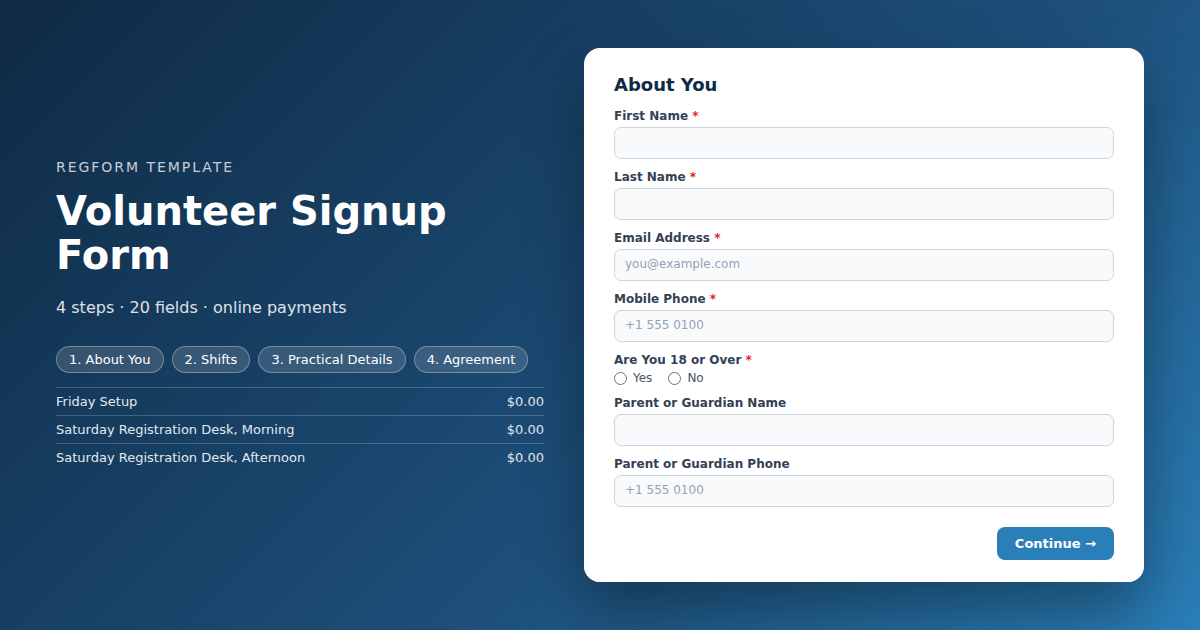
About You
| Field | Type | Required | Notes |
|---|---|---|---|
| First Name | text |
Required | — |
| Last Name | text |
Required | — |
| Email Address | email |
Required | — |
| Mobile Phone | phone |
Required | — |
| Are You 18 or Over | radio |
Required | — |
| Parent or Guardian Name | text |
Optional | — |
| Parent or Guardian Phone | phone |
Optional | — |
| Emergency Contact Name and Phone | text |
Required | — |
Shifts
| Field | Type | Required | Notes |
|---|---|---|---|
| text_block | text_block |
Optional | — |
| Shifts | item_select |
Required | — |
| Roles You Would Prefer | checkbox |
Optional | — |
| Have You Volunteered With Us Before | radio |
Optional | — |
| text_block | text_block |
Optional | — |
Practical Details
| Field | Type | Required | Notes |
|---|---|---|---|
| Volunteer Shirt Size | dropdown |
Optional | — |
| Dietary Restrictions | checkbox |
Optional | — |
| Accessibility or Support Needs | textarea |
Optional | — |
| Anything Else | textarea |
Optional | — |
Agreement
| Field | Type | Required | Notes |
|---|---|---|---|
| Volunteer Agreement and Waiver | legal |
Required | — |
| I consent to photography and video at this event | checkbox |
Optional | — |
| I will let the organizers know as soon as possible if I cannot make a shift | checkbox |
Required | — |
How it's built in Regform
Setup checklist
- Build the shifts from your real schedule. Each shift is a zero priced cart item with a headcount cap. Name them with the day, the role and the hours, because a volunteer choosing from a list of vague labels will pick the wrong one and not turn up.
- Turn the waitlist on and leave it on. Volunteer availability shifts constantly. When a shift fills, queuing the next person costs nothing and gives you somebody to call when a volunteer drops out the night before, which they will.
- Cap generously on the unpopular shifts. Teardown and early mornings are always undersubscribed. Capping them tightly to match your ideal plan just means the form turns people away from the shifts you most need filled.
- Keep the waiver as a legal field. Consent is recorded with the submission, so the signup and the waiver are one record. Put your real policy in, and cover what volunteers are and are not covered for.
- Decide your minor policy before launch. The form asks whether the volunteer is over eighteen and collects guardian details when they are not. If you do not accept volunteers under eighteen, remove the question and say so in the description rather than collecting details you will have to reject.
- Confirm with the shift details in the email. Where to report, who to ask for and what to wear. A volunteer who cannot find the check in desk is a volunteer who leaves.
Before you publish
Sign up for two shifts and confirm both appear on the confirmation. Fill one shift to its cap and check that the next person is queued rather than blocked. Then read it on a phone, since volunteers sign up from one far more often than attendees do.
Frequently asked questions
How does shift capacity work if nothing is being paid for?
Each shift is a cart item priced at zero with its own headcount cap. Volunteers select the shifts they can cover and the form stops offering one that is full. Pricing them at zero means the cart mechanics handle capacity and confirmation without anybody being asked for payment details.
What happens when a shift fills up?
They queue. The waitlist is on with item capacity enabled, so somebody who wants a full shift is captured in order rather than turned away. This matters more for volunteers than for paid registration, because you will lose people to last minute conflicts and you need a list to call when that happens.
Can one volunteer sign up for several shifts?
Yes, and most will. The shift field allows multiple selections, so one volunteer can cover Saturday morning registration and Saturday teardown in a single signup without filling the form in twice. Each selection counts against that shift's own cap independently, so a volunteer can be confirmed for one shift and waitlisted for another in the same submission.
How are volunteers under eighteen handled?
The form asks whether the volunteer is over eighteen and reveals guardian name and contact fields when the answer is no. Decide your policy before launching. If you do not accept volunteers under eighteen, take the question out entirely and say so in the description rather than collecting details you intend to reject.
How is the liability waiver captured?
Through the legal field on the agreement step, so consent is recorded as part of the same submission rather than in a separate document somebody has to match up afterwards. Put your actual policy in and be specific about what volunteers are and are not covered for, since a generic waiver is worth very little.
What should the confirmation email say?
Put the reporting location, the contact person and the dress code in the confirmation email. Volunteers are doing you a favour and are far more likely than attendees to simply not show up if the arrangements are unclear. A volunteer who cannot find the check in desk on the morning is one you have lost.
How should I set caps on unpopular shifts?
Cap them generously rather than to your ideal plan. Teardown and early morning shifts are always the hardest to fill, and a tight cap on an unpopular shift just means the form turns away somebody willing to do the job nobody else wants. You can always release people later.
Browse related categories
Form type: Event Registration Forms
Use cases: Volunteer Coordination
Capabilities: Capacity Limits Conditional Logic Confirmation Email Waitlist
Ready to launch your volunteer signup form?
Tell us about your event and we'll set this template up with you — fields, logic, payments, and all.
- Multi-step forms & conditional logic
- Built-in checkout, payments & invoicing
- Event registration, reporting & team roles
Use This Template
We'll reach out and get you building.
Download template (JSON)Import the file with the builder's Import button in your own account.
Already have an account? Sign in