
Submission and Application Forms
Abstract and Speaker Submission Form
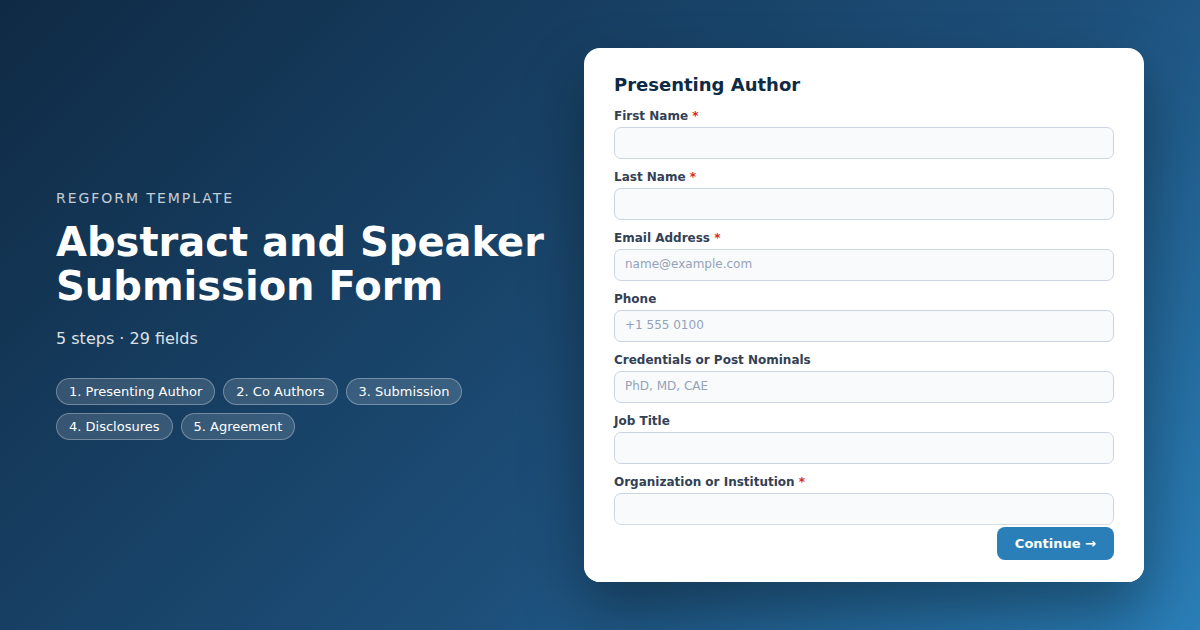
A call for papers that produces a reviewable record. Abstract text with a word limit, format and track routing, format specific follow up questions, and conflict of interest disclosure.
Overview
A call for papers has a different shape from a registration form. Nobody is paying, nothing is being reserved, and the submission is the beginning of a review process rather than the end of a transaction. What the form has to produce is a record a programme committee can actually allocate and score.
What this form collects
Who is presenting and how to reach them, the abstract itself with a word limit, the format and track that determine which reviewers see it, and the disclosures your accreditation or governance requires. It asks different follow up questions depending on the format chosen, so a workshop proposal is not answering questions written for a poster.
The abstract body is pasted text rather than an attached document, because the template format cannot carry a file upload field. Regform supports uploads, so you can add one in the builder after importing if you need the document itself. In practice many calls for papers run on pasted text anyway, and it produces a more consistent read for reviewers.
Who it is for
Association programme committees, academic and clinical conference organizers, and anyone running a call for speakers where submissions need routing, scoring and a decision rather than simply being collected.
How to adapt it
Tracks and formats are the two fields that do the real work, because they determine who reviews what. Set those to match the programme you are actually building. Cut the disclosure section only if you have no accreditation or governance requirement, and keep the word limit visible in the label where submitters will see it.
Form field list
Presenting Author
| Field | Type | Required | Notes |
|---|---|---|---|
| First Name | text |
Required | — |
| Last Name | text |
Required | — |
| Email Address | email |
Required | — |
| Phone | phone |
Optional | — |
| Credentials or Post Nominals | text |
Optional | — |
| Job Title | text |
Optional | — |
| Organization or Institution | text |
Required | — |
| Speaker Biography | textarea |
Required | — |
| Headshot Link | text |
Optional | — |
Co Authors
| Field | Type | Required | Notes |
|---|---|---|---|
| Co Authors | textarea |
Optional | — |
| All listed co authors have agreed to this submission | checkbox |
Optional | — |
Submission
| Field | Type | Required | Notes |
|---|---|---|---|
| Presentation Title | text |
Required | — |
| Presentation Format | radio |
Required | — |
| Workshop Length | dropdown |
Optional | — |
| Proposed Panelists | textarea |
Optional | — |
| Track | dropdown |
Required | — |
| Abstract | textarea |
Required | — |
| Keywords | text |
Optional | — |
| Learning Objectives | textarea |
Optional | — |
| Supporting Material Link | text |
Optional | — |
Disclosures
| Field | Type | Required | Notes |
|---|---|---|---|
| Has This Work Been Presented or Published Elsewhere | radio |
Required | — |
| Prior Presentation Details | textarea |
Optional | — |
| Do Any Authors Have a Conflict of Interest to Declare | radio |
Required | — |
| Conflict of Interest Details | textarea |
Optional | — |
| Was This Work Commercially Supported or Funded | radio |
Optional | — |
| Audio Visual Requirements | checkbox |
Optional | — |
Agreement
| Field | Type | Required | Notes |
|---|---|---|---|
| Availability | checkbox |
Optional | — |
| Submission Terms and Recording Release | legal |
Required | — |
| If accepted, the presenting author will register for and attend the event | checkbox |
Required | — |
How it's built in Regform
Setup checklist
- Set your word limit and say it out loud. The abstract body is a text area, so enforce the limit in the label and the help text. Submitters who paste 800 words into a 300 word field will not notice until a reviewer complains, and by then the deadline has passed.
- Match the tracks to your actual programme. Track and format are what route a submission to the right reviewers. Vague options produce a pile nobody can allocate, so use the same track names your programme committee already works from.
- Route submissions for review. The approval path holds each submission pending until a reviewer decides. Decide up front whether reviewers see author names or work blind, because that shapes what you show them.
- Close the form on the deadline. Set the cutoff and decide what the page says afterwards. A call for papers that quietly keeps accepting submissions after the deadline creates a fairness problem you will have to adjudicate.
- Ask for the disclosure properly. Conflict of interest and commercial support are compliance requirements in medical, legal and accredited education contexts. The template asks the question and reveals the detail field only when the answer is yes.
- Confirm receipt immediately. Academics and practitioners submit close to the deadline and want proof it landed. The confirmation should restate the title, the track and the decision date.
Before you publish
Submit once as an oral presentation and once as a workshop, and confirm the workshop length question appears only for the second. Submit with a declared conflict of interest and check the detail field becomes required. Then read the confirmation email as a submitter would and ask whether it tells them what happens next and when.
Frequently asked questions
How is the abstract itself collected?
As pasted text with a stated word limit. The template format cannot carry a file upload field, so the abstract body is a text area rather than a document attachment. That is how a large share of calls for papers already run, and it has the advantage that reviewers read consistent plain text rather than fighting with whatever each submitter exported from their word processor.
What if I need slides or a full paper?
The template collects a link, but Regform itself supports file uploads, so once you have imported it you can swap that link field for a real upload in the builder with your own file type and size limits. Ten megabytes is the platform ceiling. For a large call you may still prefer to collect full papers only from accepted authors, when the list is a fraction of the size.
How does review and approval work?
Each submission is held pending until a reviewer decides, so nothing is implicitly accepted by arriving. Decide before you launch whether reviewers see author names or review blind, because that decision shapes what you display to them and it is much harder to change once submissions are in flight.
Can I ask different questions for different presentation formats?
Format drives the follow up questions. Choosing a workshop reveals a length question that does not appear for an oral abstract, and choosing a panel reveals a panelist list. Keeping those questions hidden from everyone else is what stops a submission form from feeling like paperwork.
Does this handle conflict of interest disclosure?
Yes, and in accredited or clinical contexts you generally must. The template asks whether a conflict exists and reveals the detail field only when the answer is yes, along with a separate question on commercial support. That keeps the form short for the majority while still capturing the disclosure you are obliged to hold.
How should co-authors be captured?
Collect them as a single text block listing names, affiliations and order rather than as repeating fields. Co-author lists vary wildly in length and most of what you need is the citation line. If your process requires each co-author to consent individually, handle that after acceptance rather than blocking the submission.
What happens when the deadline passes?
Set a cutoff date and close the form automatically. Submitters overwhelmingly arrive in the final forty eight hours, so decide in advance what the page says afterwards and whether a late window exists. Pointing at a notification list is more useful than a dead page, and it gives you an audience for next year's call.
Is the word limit actually enforced?
Nothing in the form enforces it. The template states the limit in the field label and help text, but there is no maximum length setting on a text area, so a submitter can paste far more than you asked for. Decide in advance whether over length submissions are returned or trimmed, and say so in the call.
Browse related categories
Form type: Submission and Application Forms
Use cases: Speaker and Abstract Submissions
Capabilities: Approval Workflow Conditional Logic Confirmation Email
Ready to launch your abstract and speaker submission form?
Tell us about your event and we'll set this template up with you — fields, logic, payments, and all.
- Multi-step forms & conditional logic
- Built-in checkout, payments & invoicing
- Event registration, reporting & team roles
Use This Template
We'll reach out and get you building.
Download template (JSON)Import the file with the builder's Import button in your own account.
Already have an account? Sign in