
Submission and Application Forms
Speaker Confirmation Form
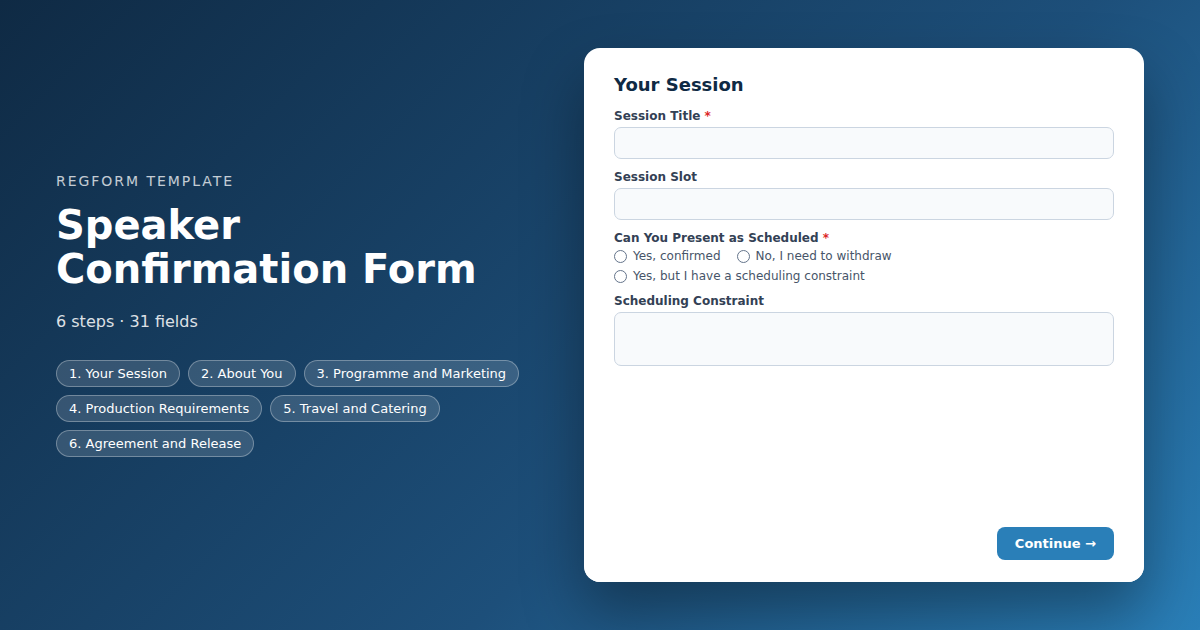
Everything owed by a confirmed speaker in one pass, sent while they are still excited. Bio and headshot, AV and room needs, travel, and an explicit recording release.
Overview
Accepting a speaker is the easy part. What follows is six weeks of chasing a headshot, discovering on the day that somebody needs a confidence monitor, and finding out during the session that one presenter never agreed to be recorded.
What this form does
It collects everything owed by a confirmed speaker in a single pass, at the one moment they are guaranteed to be paying attention: immediately after acceptance. Bio and headshot for the programme, AV and room requirements for production, travel details if you are covering them, and an explicit recording release.
The session title and slot should be prefilled from your programme rather than typed, so the authoritative version stays the one already at the printer.
Who it is for
Conference programme teams, association education staff and anyone running a multi speaker event where production and marketing both need things from the same people.
How to adapt it
Prune the AV list to what you can actually deliver, and remove the travel section outright unless you are paying. Set one asset deadline and repeat it in the form, the confirmation and the reminder. Speakers do not miss deadlines out of malice, they miss the ones they were told about once.
Form field list
Your Session
| Field | Type | Required | Notes |
|---|---|---|---|
| text_block | text_block |
Optional | — |
| Session Title | text |
Required | — |
| Session Slot | text |
Optional | — |
| Can You Present as Scheduled | radio |
Required | — |
| Scheduling Constraint | textarea |
Optional | — |
About You
| Field | Type | Required | Notes |
|---|---|---|---|
| First Name | text |
Required | — |
| Last Name | text |
Required | — |
| Email Address | email |
Required | — |
| Mobile Phone | phone |
Required | — |
| Name and Credentials for the Programme | text |
Required | — |
| Job Title | text |
Required | — |
| Organization | text |
Required | — |
Programme and Marketing
| Field | Type | Required | Notes |
|---|---|---|---|
| Speaker Biography | textarea |
Required | — |
| Headshot Link | text |
Optional | — |
| Session Description for the Programme | textarea |
Required | — |
| Social Handles | text |
Optional | — |
Production Requirements
| Field | Type | Required | Notes |
|---|---|---|---|
| How Will You Present | radio |
Required | — |
| Demo Requirements | textarea |
Optional | — |
| AV Requirements | checkbox |
Optional | — |
| Preferred Room Setup | dropdown |
Optional | — |
| Accessibility or Support Needs | textarea |
Optional | — |
Travel and Catering
| Field | Type | Required | Notes |
|---|---|---|---|
| text_block | text_block |
Optional | — |
| Do You Need Travel or Accommodation Arranged | radio |
Optional | — |
| Arrival Date | date |
Optional | — |
| Departure Date | date |
Optional | — |
| Travel Notes | textarea |
Optional | — |
| Dietary Restrictions | checkbox |
Optional | — |
Agreement and Release
| Field | Type | Required | Notes |
|---|---|---|---|
| Speaker Agreement | legal |
Required | — |
| Do You Consent to Your Session Being Recorded and Distributed | radio |
Required | — |
| Anything We Should Know About Declining | textarea |
Optional | — |
| I consent to photography during my session | checkbox |
Optional | — |
How it's built in Regform
Setup checklist
- Send it the moment acceptances go out. A speaker is never more responsive than in the hour they learn they have been accepted. Every day you wait is a day closer to chasing a bio by phone.
- Prefill what you already know. The title and session slot come from your programme, not from the speaker. Use URL prefill on those fields so the speaker confirms rather than retypes, and you avoid a title that drifts from the one in your printed programme.
- Set one asset deadline and repeat it everywhere. In the form, in the confirmation email and in the reminder. Speakers miss deadlines they were told once, in a different email, six weeks earlier.
- Ask about AV honestly. Every request you accept here is a thing your production team has to deliver. If you cannot support a demo needing dedicated bandwidth, do not offer it as an option.
- Get the recording release explicitly. This is where it belongs, not buried in the original call for papers. A speaker who declines is far cheaper to discover now than on the day, and the legal field records consent with the submission.
- Leave the edit link open until the artwork deadline. Bios and titles change. A speaker who can fix their own headshot link is a speaker who does not email your programme manager.
Before you publish
Submit once declining the recording release and once with a workshop format, and confirm the follow up questions behave. Check that your prefilled fields populate from a real URL. Then read the confirmation email and ask whether a speaker would know exactly what is owed and when.
Frequently asked questions
When should this form go out?
Immediately after acceptances go out. A speaker is never more engaged than in the hour they learn they are on the programme, and responsiveness falls away steadily after that. Sending this form a fortnight later is the difference between collecting bios by return and chasing them by phone in the final week.
How do I stop session titles drifting from the programme?
Prefill them from your programme using URL parameters rather than asking the speaker to type them. The session title in your printed programme should be the authoritative one, and asking a speaker to retype it guarantees a version that differs by a word or two from what is already at the printer.
Where should the recording release live?
Here, explicitly, as a legal field that records consent with the submission. Burying it in the original call for papers is a mistake, because a speaker who intends to decline should be discovered now rather than on the day. The template also asks separately about photography, since some speakers will accept one and not the other.
What AV options should I offer?
Only the ones you can actually deliver. Every option on that list is a commitment your production team has to honour in a room, and a speaker who ticked a box for a dedicated internet connection will expect one. Prune the list to what your venue and budget genuinely support.
How are headshots and slides collected?
Through links rather than attachments, since the template format cannot carry a file upload field. Regform supports uploads, so add one in the builder after importing if you would rather collect files directly. Either way, set one deadline for all assets and repeat it in the form, the confirmation and the reminder.
What if a speaker's details change before the event?
Keep the edit link open until your artwork deadline. Bios and titles change more often than you would expect, particularly when a speaker changes job between acceptance and the event. Letting them correct it themselves is far cheaper than having your programme manager retype it from an email.
Should I ask about travel?
Ask about travel and accommodation only if you are paying for them. If you are not, the question raises an expectation you will then have to manage down. Where you do cover costs, capture the arrival and departure dates here so your travel desk can work from one source rather than a thread.
Browse related categories
Form type: Submission and Application Forms
Use cases: Speaker and Abstract Submissions
Capabilities: Conditional Logic Confirmation Email
Ready to launch your speaker confirmation form?
Tell us about your event and we'll set this template up with you — fields, logic, payments, and all.
- Multi-step forms & conditional logic
- Built-in checkout, payments & invoicing
- Event registration, reporting & team roles
Use This Template
We'll reach out and get you building.
Download template (JSON)Import the file with the builder's Import button in your own account.
Already have an account? Sign in