
Waiver and Consent Forms
Photo and Video Release Form
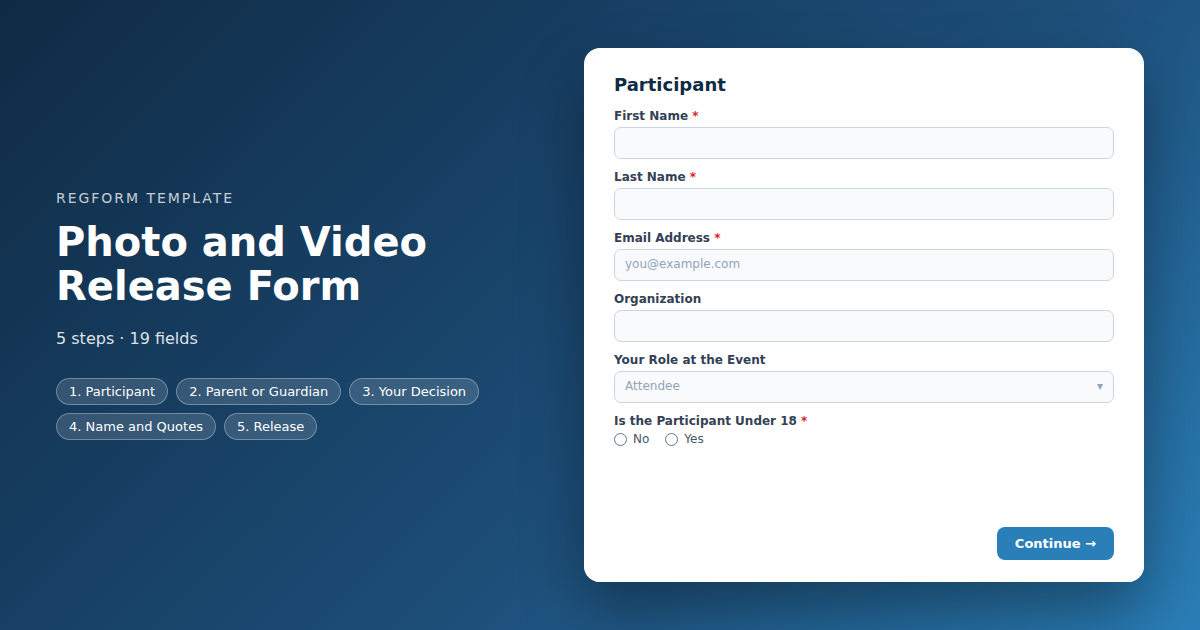
Image consent as its own decision, with a real decline path. Permitted uses listed individually, name attribution asked separately, and a guardian route for minors.
Overview
Most event photo releases are a line of small print inside a registration form, ticked by everybody because declining would have meant not registering. That is a signature rather than consent, and it tends to be discovered as a problem at the moment somebody sees themselves on a conference website and objects.
What this form does
It treats image consent as its own decision with a real decline path. Somebody can grant full consent, limit it to particular uses, or decline outright, and all three are recorded properly. Permitted uses are listed individually rather than bundled, so consent to appear in a recap video is not also consent to appear in paid advertising.
Name attribution is asked separately from image use, because they are genuinely different permissions and plenty of people will grant one and not the other. Participants under eighteen route to a guardian, and everybody receives their own copy of what they agreed to with the date attached.
Who it is for
Conference and trade show organizers who photograph attendees, association teams producing recap content, and anyone recording sessions or running a photographer at an event with a professional audience.
How to adapt it
Replace the placeholder release language with text reviewed by somebody qualified in your jurisdiction, and prune the usage list to what you actually do. Then make sure the declines reach the photographer, because a release nobody acts on is just a record of a promise you broke.
Form field list
Participant
| Field | Type | Required | Notes |
|---|---|---|---|
| First Name | text |
Required | — |
| Last Name | text |
Required | — |
| Email Address | email |
Required | — |
| Organization | text |
Optional | — |
| Your Role at the Event | dropdown |
Optional | — |
| Is the Participant Under 18 | radio |
Required | — |
Parent or Guardian
| Field | Type | Required | Notes |
|---|---|---|---|
| text_block | text_block |
Optional | — |
| Parent or Guardian Full Name | text |
Optional | — |
| Relationship to Participant | text |
Optional | — |
| Parent or Guardian Email | email |
Optional | — |
Your Decision
| Field | Type | Required | Notes |
|---|---|---|---|
| text_block | text_block |
Optional | — |
| Your Decision | radio |
Required | — |
| Permitted Uses | checkbox |
Optional | — |
| Your Conditions | textarea |
Optional | — |
| Anything We Should Know | textarea |
Optional | — |
Name and Quotes
| Field | Type | Required | Notes |
|---|---|---|---|
| You may use my name and job title in captions or quotes | checkbox |
Optional | — |
| You may use a quote or testimonial I have given | checkbox |
Optional | — |
Release
| Field | Type | Required | Notes |
|---|---|---|---|
| Photo and Video Release | legal |
Required | — |
| As parent or guardian, I agree to this release on behalf of the participant | checkbox |
Optional | — |
How it's built in Regform
Setup checklist
- Have the release text reviewed. The placeholder language here is a structure showing what a release usually covers. Image rights are jurisdiction specific and the text you actually publish should be drafted or checked by somebody qualified where you operate.
- List only the uses you will actually make. Every checkbox is a permission you are asking for, and a long list of speculative uses makes people decline the whole thing. Ask for what your marketing team genuinely does.
- Keep a real decline path. Somebody who declines should be able to submit and be recorded as declining, not be blocked. A form that only accepts consent is not collecting consent, it is collecting signatures from people who had no alternative.
- Decide what a decline means operationally. A red lanyard, a note to the photographer, a seat outside the camera line. The release is only useful if the decline reaches the person holding the camera, and that is a process question rather than a form one.
- Ask separately about names. Being photographed and being named in a caption are different permissions, and plenty of people will grant one and not the other. This form asks them separately.
- Set the term and say it plainly. Perpetual worldwide usage is the industry default and it is also the thing people most object to when they notice it. Say what you are asking for rather than burying it.
Before you publish
Have the text reviewed, then submit once granting full consent, once limiting it and once declining, and confirm all three record correctly and that the decline is not blocked. Then check the confirmation reaches the participant with their choice stated.
Frequently asked questions
Why separate this from the liability waiver?
Bundling them means anybody who objects to being photographed has to decline the liability waiver too, which usually means they cannot participate at all. That is not consent, it is a signature from somebody with no alternative. Separating them gives people a genuine choice on the one that is actually optional.
Can somebody decline and still attend?
Yes, and the decline path has to be real. Somebody choosing to decline should be able to submit the form and be recorded as having declined, rather than being blocked. What matters operationally is that the decline reaches the photographer, usually through a different lanyard colour or a list at the check in desk.
Which usage permissions should I list?
Only the ones you will actually make. Each checkbox is a separate permission, and a long list of speculative future uses makes people decline the whole thing rather than think about it. Ask for what your marketing team genuinely does with event photography and leave the rest out.
Should I ask about using someone's name too?
Separately, because they are different permissions and plenty of people grant one without the other. Somebody may be relaxed about appearing in a crowd photo and quite unwilling to be named and quoted in a case study. This form asks about image use and name attribution as two distinct questions.
How are minors handled?
A parent or guardian completes the release on their behalf, and the form reveals guardian name, relationship and contact details when the participant is under eighteen. If your event does not admit minors at all, remove that path rather than collecting details you intend to reject.
What term and territory should I ask for?
State it plainly rather than burying it. Perpetual worldwide usage is the industry default, and it is also the specific thing people object to when they read carefully. A shorter term or a stated territory is perfectly workable for most event marketing and reads far better than asking for everything forever.
What if somebody wants to allow some uses but not others?
Use the limited consent option, which reveals a field for the person to describe what they are and are not comfortable with. Common limits are no social media, internal use only, or no close up shots. Make sure whoever briefs the photographer actually sees those notes, because an unread limitation is worse than none.
Browse related categories
Form type: Waiver and Consent Forms
Use cases: Attendee Registration
Capabilities: Conditional Logic Confirmation Email
Ready to launch your photo and video release form?
Tell us about your event and we'll set this template up with you — fields, logic, payments, and all.
- Multi-step forms & conditional logic
- Built-in checkout, payments & invoicing
- Event registration, reporting & team roles
Use This Template
We'll reach out and get you building.
Download template (JSON)Import the file with the builder's Import button in your own account.
Already have an account? Sign in