
Waiver and Consent Forms
Event Waiver and Consent Form
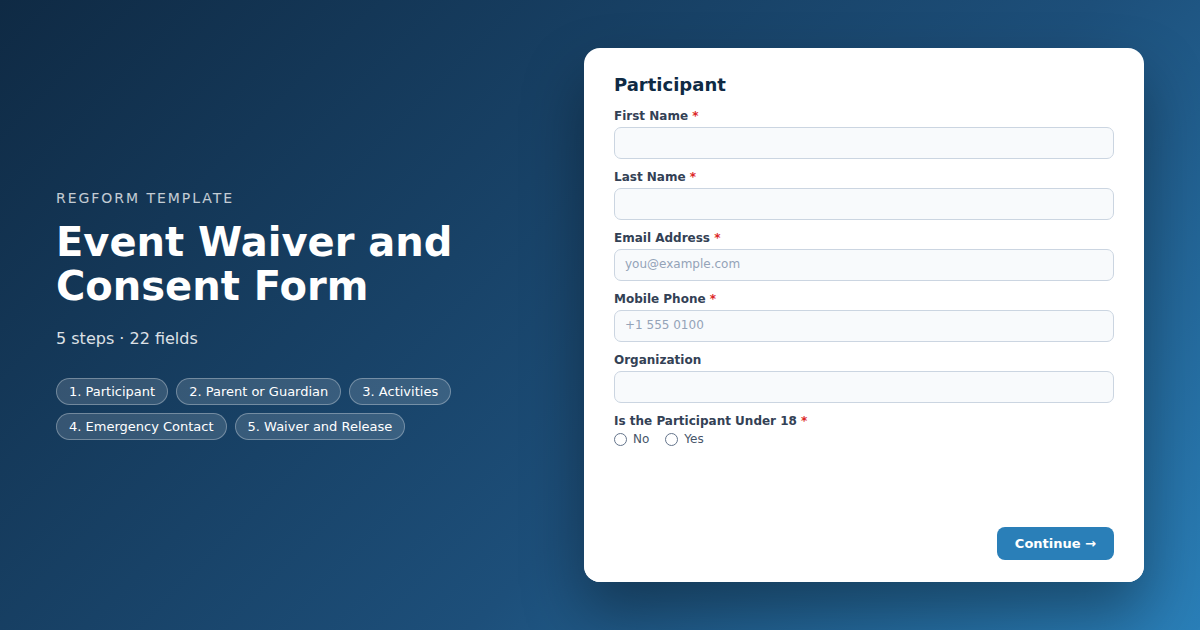
Records consent as a timestamped submission with the participant's own copy. Activity specific acknowledgements, a guardian path for minors, and photo consent kept separate.
Overview
A waiver is only worth something if the right person agreed to the right text before they participated, and you can produce the record afterwards. Most event waivers fail one of those three tests, usually the last one, because consent was collected on a clipboard that is now in a box somewhere.
What this form does
It records consent as a timestamped submission with the participant's own copy in their inbox. The acknowledgements change depending on which activities somebody is joining, so a site tour carries the hazards a keynote does not. Minors get a guardian path, and photo consent is kept separate from the liability waiver so declining one does not mean declining both.
Who it is for
Event organizers running anything beyond a seated conference: site visits and facility tours, physical or outdoor activities, volunteer days, charity runs, and any programme that admits participants under eighteen.
How to adapt it
The waiver text is the template, not the document. Replace the placeholder language with your own and have somebody qualified in your jurisdiction review it, because enforceability varies widely and nothing here constitutes legal advice. Then match the activity acknowledgements to what you actually run.
Form field list
Participant
| Field | Type | Required | Notes |
|---|---|---|---|
| First Name | text |
Required | — |
| Last Name | text |
Required | — |
| Email Address | email |
Required | — |
| Mobile Phone | phone |
Required | — |
| Organization | text |
Optional | — |
| Is the Participant Under 18 | radio |
Required | — |
Parent or Guardian
| Field | Type | Required | Notes |
|---|---|---|---|
| text_block | text_block |
Optional | — |
| Parent or Guardian Full Name | text |
Optional | — |
| Relationship to Participant | text |
Optional | — |
| Parent or Guardian Email | email |
Optional | — |
| Parent or Guardian Phone | phone |
Optional | — |
Activities
| Field | Type | Required | Notes |
|---|---|---|---|
| Which Activities Are You Taking Part In | checkbox |
Required | — |
| text_block | text_block |
Optional | — |
| text_block | text_block |
Optional | — |
| Relevant Medical Information | textarea |
Optional | — |
Emergency Contact
| Field | Type | Required | Notes |
|---|---|---|---|
| Emergency Contact Name | text |
Required | — |
| Emergency Contact Phone | phone |
Required | — |
| Relationship to Participant | text |
Optional | — |
Waiver and Release
| Field | Type | Required | Notes |
|---|---|---|---|
| Waiver and Release of Liability | legal |
Required | — |
| As parent or guardian, I agree to this waiver on behalf of the participant | checkbox |
Optional | — |
| I agree to follow the event code of conduct and all safety instructions given by staff | checkbox |
Required | — |
| I consent to being photographed or filmed, and to those images being used in event promotion | checkbox |
Optional | — |
How it's built in Regform
Setup checklist
- Put your real waiver text in, and have somebody qualified read it. The placeholder text in this template is a structure, not a legal document. A waiver drafted by an event team and never reviewed is the kind of thing that turns out to be worthless exactly when it matters.
- Match the risk to the activity. A waiver written for a conference room is not the waiver for a construction site tour or a charity run. The template asks which activities the participant is joining and reveals the relevant acknowledgements.
- Decide your minor policy before launch. The form asks for date of birth, calculates nothing, and reveals guardian fields when the participant says they are under eighteen. If you do not permit minors, remove the path entirely rather than collecting details you will reject.
- Keep photo consent separate from the liability waiver. Bundling them means somebody who wants to opt out of photography has to decline the waiver, which they cannot do and still participate. Two separate questions, two separate records.
- Record the date and keep the confirmation. The submission timestamp is your evidence that consent was given before participation. Make sure the confirmation email goes to the participant and that you can retrieve it later.
- Use it as a standalone form or a step. This works on its own for a site visit or an activity, and its consent step can be lifted into a registration form when the waiver belongs inline.
Before you publish
Have the waiver text reviewed by someone qualified in your jurisdiction. Then submit once as an adult and once as a minor, confirm the guardian section behaves, and check that the confirmation reaches the participant with the date on it.
Frequently asked questions
Is the waiver text in this template legally sound?
No, and nothing here should be treated as legal advice. The template provides the structure a waiver usually needs and placeholder text showing where your own wording goes. The actual language has to be drafted or reviewed by someone qualified in your jurisdiction, because enforceability varies significantly and a waiver written by an events team is often worth very little.
How are minors handled?
The participant states whether they are under eighteen and guardian name, relationship, contact details and a separate guardian agreement appear when they are. If your event does not permit minors at all, remove that path completely and say so in the description rather than collecting guardian details you intend to reject.
Should photo consent be part of the waiver?
Keep them separate, which is how this template is built. If you bundle photo consent into the liability waiver, anybody who does not want to be photographed has to decline the whole thing, which means they cannot participate. Two questions, two records, and the participant keeps a real choice on the one that is genuinely optional.
Can one waiver cover activities with different risk levels?
Yes. The activity question reveals different acknowledgements, so somebody joining a site tour sees the relevant hazards while a conference attendee does not. Extend the condition list rather than adding parallel rules, because two rules acting on the same field is where conditional logic becomes unpredictable.
What is the evidence that somebody signed?
The submission timestamp is your record that consent was given before participation, and the confirmation email is the participant's copy. Make sure you can retrieve submissions later, because a waiver you cannot produce when asked is functionally the same as not having one at all.
Should this be its own form or part of registration?
Either. It works standalone for a site visit, an activity or a volunteer day, and the consent step can be lifted into a registration form when the waiver belongs inline. Standalone is usually better when the activity is optional, since it keeps the main registration short for everybody who is not doing it.
What else should a waiver form collect?
Collect an emergency contact, and for physical activities collect relevant medical information too. This template asks for both. Decide who has access to that data on the day and how long you keep it afterwards, because it is more sensitive than anything else on the form and it should not outlive the event by much.
Browse related categories
Form type: Waiver and Consent Forms
Use cases: Attendee Registration
Capabilities: Conditional Logic Confirmation Email
Ready to launch your event waiver and consent form?
Tell us about your event and we'll set this template up with you — fields, logic, payments, and all.
- Multi-step forms & conditional logic
- Built-in checkout, payments & invoicing
- Event registration, reporting & team roles
Use This Template
We'll reach out and get you building.
Download template (JSON)Import the file with the builder's Import button in your own account.
Already have an account? Sign in