
Exhibitor and Sponsor Forms
Exhibitor Services Order Form
Turns the service manual into an orderable catalogue. Quantity based furniture, power, connectivity, AV and labor, with booth number captured up front and contractor ready output.
Overview
Exhibitor services is where a well run show quietly loses money and goodwill. Orders arrive by email with no booth number, the contractor gets a spreadsheet that does not match their rate card, and on move in morning three exhibitors are standing in empty booths asking where their tables are.
What this form does
It turns the service manual into an orderable catalogue. Every line is a priced item with a quantity, so an exhibitor orders two chairs and a counter the same way they would buy anything else, and the total is correct before they submit. Booth number is captured at the point of ordering rather than chased afterwards, and ordering electrical or labor reveals the follow up questions your contractor actually needs answered.
What comes out is a list your contractor can fulfil directly, organized by booth, in the same language as their own rate card.
Who it is for
Trade show organizers and association meeting teams who resell contractor services, and anyone running an expo hall where exhibitors need to order furniture, power, connectivity or labor ahead of move in.
How to adapt it
Your contractor's rate card is the input, and using their item names verbatim is worth more than making them read nicely. Set the advance order deadline, cap anything with finite inventory, and prune the catalogue to what you genuinely offer rather than listing everything the contractor could theoretically supply.
Form field list
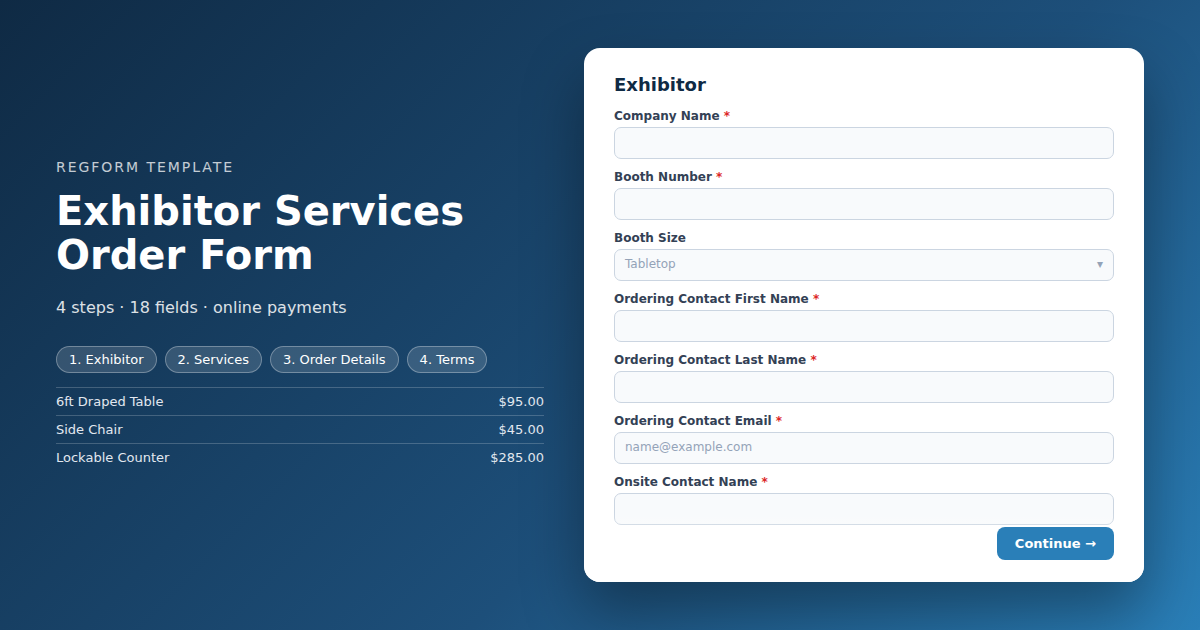
Exhibitor
| Field | Type | Required | Notes |
|---|---|---|---|
| Company Name | text |
Required | — |
| Booth Number | text |
Required | — |
| Booth Size | dropdown |
Optional | — |
| Ordering Contact First Name | text |
Required | — |
| Ordering Contact Last Name | text |
Required | — |
| Ordering Contact Email | email |
Required | — |
| Onsite Contact Name | text |
Required | — |
| Onsite Contact Mobile | phone |
Required | — |
Services
| Field | Type | Required | Notes |
|---|---|---|---|
| text_block | text_block |
Optional | — |
| Services | item_select |
Required | — |
Order Details
| Field | Type | Required | Notes |
|---|---|---|---|
| text_block | text_block |
Optional | — |
| Electrical Placement | textarea |
Optional | — |
| Internet Requirements | textarea |
Optional | — |
| Labor Schedule and Scope | textarea |
Optional | — |
| Your Move In Date | date |
Optional | — |
| Special Instructions | textarea |
Optional | — |
Terms
| Field | Type | Required | Notes |
|---|---|---|---|
| Services Terms and Cancellation Policy | legal |
Required | — |
| We understand that venue labor rules may require contractor crews for installation work | checkbox |
Required | — |
How it's built in Regform
Setup checklist
- Load the kit from your contractor's rate card. Every line is a quantity based cart item. Use the contractor's own item names so an exhibitor comparing this form against the service manual sees the same words, and so your reconciliation with the contractor is a straight match.
- Set your discount deadline and make it real. The advance order rate is most of what drives exhibitors to order early. Publish the date in the form, the confirmation and every reminder, and close the discounted items on that date rather than honouring the rate late.
- Make the booth number required. An order without a booth number cannot be delivered and will sit in your inbox while somebody works out who sent it. This is the single most common failure on a services form.
- Cap anything you have a finite number of. Lead retrieval scanners and premium AV usually have a hard inventory limit. Cap them and the form stops selling what you cannot supply.
- Capture the onsite contact separately. The person ordering is rarely the person standing in the booth on move in day. Collect a mobile number for whoever will actually be there.
- Turn on invoice billing. Services are bought by the same procurement process that bought the booth, usually on the same purchase order.
Before you publish
Order one of everything and check the total against the contractor rate card line by line. Order electrical and confirm the placement question appears. Then check that the export gives your contractor a clean list by booth number, because that file is what actually gets fulfilled.
Frequently asked questions
How do I set up the services catalogue?
Every line is a quantity based cart item priced from your contractor's rate card. Use the contractor's own item names rather than paraphrasing them, so an exhibitor cross checking against the service manual sees matching language and your reconciliation with the contractor afterwards is a straight line by line match.
Why does the booth number matter so much?
Make it required and validate that it is filled in. An order without a booth number cannot be delivered and will sit unresolved while somebody works out who sent it. This is the most common failure on an exhibitor services form and it is entirely preventable at the point of ordering.
How should the advance order discount work?
Publish the deadline everywhere and close the discounted items when it passes rather than honouring the rate late. The advance rate is the main lever that gets exhibitors to order early, which is what gives your contractor time to plan. Honouring it after the date quietly teaches everybody to ignore the deadline next year.
What happens when somebody orders electrical?
Ordering electrical reveals a placement question, because the contractor needs to know where in the booth the drop goes and an island booth is different from an inline one. Internet and labor orders reveal their own follow ups too. Keeping those hidden from exhibitors who did not order them is what stops the form sprawling.
How do I handle items with limited stock?
Cap them. Lead retrieval scanners, premium AV and specialty items usually have a hard inventory limit, and a form that keeps selling past it creates a problem you discover on move in day. The cap closes the item cleanly and the exhibitor picks something else or contacts you.
Why collect an onsite contact?
Collect it separately from the ordering contact, because the person raising the order is rarely standing in the booth on move in day. A mobile number for whoever is actually there saves your contractor a great deal of time when something needs a decision and the office is closed.
Can exhibitors pay by purchase order?
Yes, and it should be. Services are bought through the same procurement process that bought the floor space, frequently on the same purchase order. The invoice integration routes those to a pending payment status with a payment link while card payers complete at checkout as normal.
Browse related categories
Form type: Exhibitor and Sponsor Forms
Use cases: Exhibitor and Sponsor Management
Capabilities: Capacity Limits Conditional Logic Confirmation Email Payment Collection Invoice and Purchase Orders
Ready to launch your exhibitor services order form?
Tell us about your event and we'll set this template up with you — fields, logic, payments, and all.
- Multi-step forms & conditional logic
- Built-in checkout, payments & invoicing
- Event registration, reporting & team roles
Use This Template
We'll reach out and get you building.
Download template (JSON)Import the file with the builder's Import button in your own account.
Already have an account? Sign in